
Kakobuy conversion costs: compare credited yuan with the final debit
Compare the yuan value your payment buys, then check the separate provider charge. A dated combined-cost measurement is useful context, but it is not a quote for today’s exchange rate.
Checked against official pages captured 2026-10-10 · page reviewed 2026-10-16
What the conversion comparison measures
Seller prices are commonly quoted in yuan. Your displayed currency, the agent’s conversion and the payment provider’s final debit can be different records. Compare those records separately before calling the difference an exchange-rate margin.
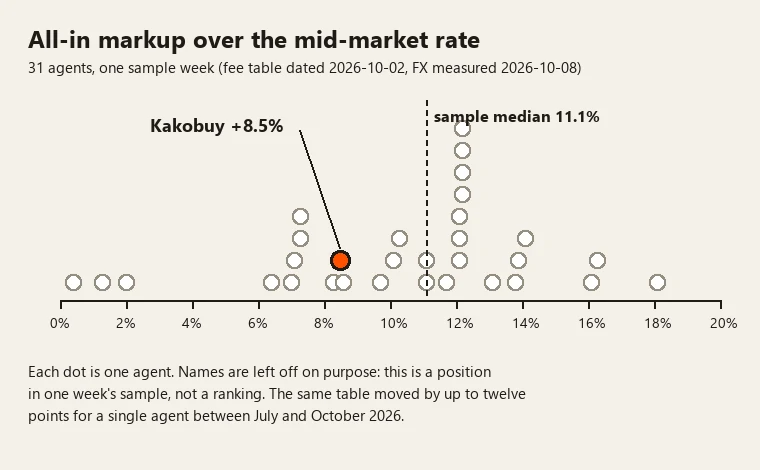
The 8 October 2026 comparison measured Kakobuy at about 8.5% for combined currency-conversion markup and standard service fees, against an 11.1% median in that dated sample. The retained table lists 8.5% in both Kakobuy’s FX and combined columns because the standard service-fee entry is zero; the cross-agent median uses the combined column. Separate provider charges are not included in that figure. The result describes that sample and date; it does not establish the cheapest agent for your parcel.
What Kakobuy says about its rate, and what was measured
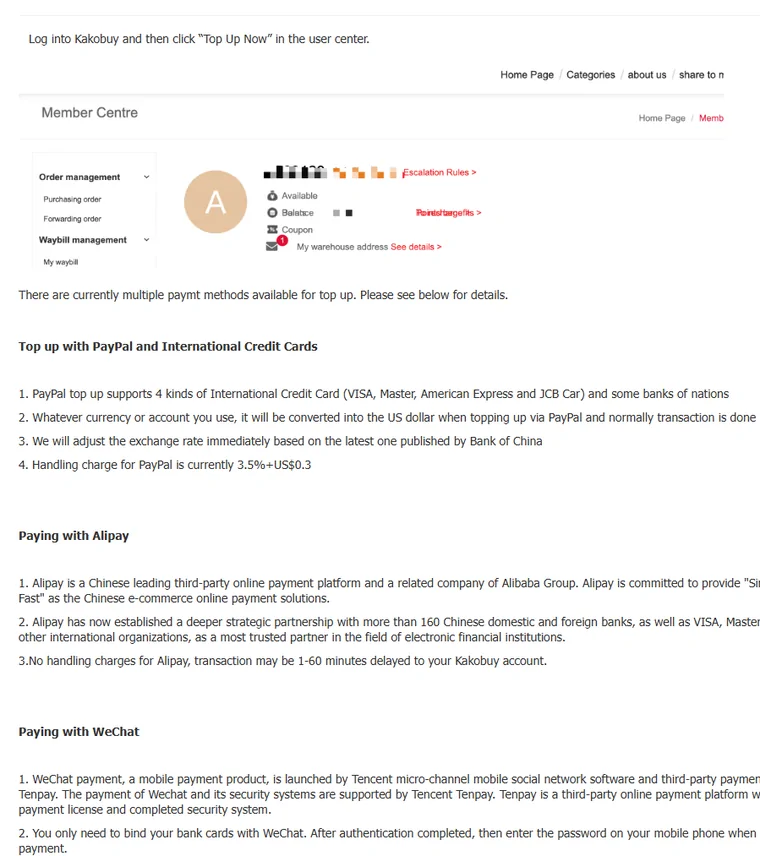
Help article 64 says Kakobuy adjusts its exchange rate “immediately based on the latest one published by Bank of China”, and that PayPal top-ups are converted into US dollars. That tells you the reference it follows. It does not tell you the gap, because a bank's published selling rate already sits some distance from mid-market, and an agent can add to it.
The 8.5% figure is an all-in conversion-and-standard-service-cost measurement. Do not treat the cross-agent combined-cost median as a pure-FX benchmark or add a standard service fee already included in the calculation a second time. Named payment-provider charges must be checked separately; compare the channel fees and their conflicting published formulas.
How to measure the margin yourself
You can make a comparison from the actual payment records. Choose one currency and record the time; do not mix a product’s rounded display price with the amount actually charged.
- Add an item to the cart and note the yuan total, including domestic delivery.
- Note the amount the checkout shows in your currency.
- In the same hour, look up the mid-market rate for your currency against the yuan.
- Divide the yuan amount by the reference rate in CNY per unit of your payment currency. This is a comparison value, not a rate you are guaranteed to obtain.
- Divide the comparable debit by that reference value and subtract one. Multiply by 100 for the percentage difference; name any standard or provider fees included in the debit.
Repeat for the same yuan amount, payment method and currency on another service at approximately the same time. If the second quote uses a different provider or includes another service, label that difference instead of presenting it as a pure rate comparison.
Where the rate shows on an order
The table is a historical combined-cost scenario, not a current conversion quote. It uses an illustrative 7.10 yuan per US dollar and applies the two dated percentages to the same yuan amount. International freight and separate payment-provider fees are not included.
| Yuan total | Mid-market value | At 8.5% combined cost | At 11.1% combined cost (dated sample median) | Gap |
|---|---|---|---|---|
| ¥300 | $42.25 | $45.85 | $46.94 | $1.10 |
| ¥1,500 | $211.27 | $229.23 | $234.72 | $5.49 |
| ¥6,000 | $845.07 | $916.90 | $938.87 | $21.97 |
The gap column is against a median, not against a named rival, and the 8.5% is a single dated measurement. The order test lets you enter your own numbers.
Display currency does not change the margin
The official header captured on 10 October 2026 offered a currency selector. Changing a display setting does not by itself establish the currency your payment provider will debit. Article 64 describes PayPal top-ups in US dollars; check whether your provider or card will perform another conversion from your own currency.
Use the final payment confirmation and provider receipt to compare costs. A convenient display currency helps you read a listing, but a rounded display amount is not evidence of a cheaper settlement rate.

Why the measurement carries a date
Rates, standard fees and payment methods can change independently. A past combined-cost figure cannot identify which component changed today. Preserve the credited yuan amount, debit currency, provider fee and time of the comparison so you can explain a difference instead of guessing.
That is why this page prints the measurement date next to the number and never puts the number in a title. If you are deciding on a large order, measure on the day.
Keep the two comparisons separate
First compare the yuan amount with the amount actually credited to your agent balance. Then compare the total charged by the payment provider with that credited value. Combining both into one unexplained percentage can make a payment-channel fee look like an exchange-rate margin. Use the same basket, currency, payment method and time when comparing services, and note whether a fixed charge is included. The small-basket result can look very different from the large-basket result. Try both basket sizes in the example tool.
A worked comparison with three separate records
Illustrative arithmetic only: suppose the item and domestic delivery total ¥700 and your chosen reference rate is ¥7 per US dollar. The reference value is $100. If the agent quotes $108 before a separately displayed $4 provider charge, the first comparison is 8% above the reference; the final $112 debit is 12% above it. Calling both figures “the exchange rate” would hide what changed.
If a second checkout quotes $110 with its provider charge already included, compare $112 with $110 for that payment, then check what each quote contains. Do not add the same charge twice. Use the historical order calculator to explore sensitivity, then replace its fixed inputs with your actual payment records before choosing.