
Help routes, the words on the order pages, and short answers
Who to contact for what, what the order-page terms mean, and answers to the questions buyers ask most about Kakobuy's structure.
Checked against official pages captured 2026-10-10 · page reviewed 2026-10-16
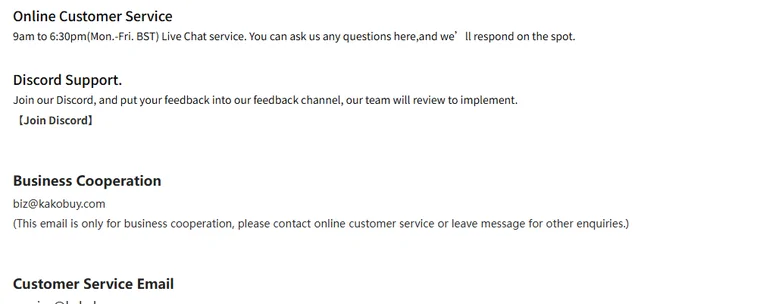
Help routes, in the order to try them
- Kakobuy's help centre, reached from the “More functions” menu. It is organised under service types, after-sales, account assets, value-added services, distribution and user notices.
- Live chat, 9:00 to 18:30 UK time, Monday to Friday, through the widget on the official site.
- Email: [email protected] for orders; [email protected] is for business enquiries only.
- The official Discord, linked from the home page card.
Questions about this guide, rather than about an order, go to [email protected]. This guide cannot see or change Kakobuy orders.
Glossary of order-page terms
| Term | Meaning on Kakobuy |
|---|---|
| QC photos | Warehouse photos of a stocked item; appearance only |
| GL / RL | Community opinions: green light or red light. Neither is an official shipment approval or an accepted return |
| OG number | Order number of a purchase; storage extensions are priced per OG number |
| Stocked in | Status used by the captured eligible return guarantee; check the next-hour trigger and applicable exclusions |
| In storage | Status that starts the 100-day free storage clock |
| Rehearsal / pre-packing | Packing a parcel early to learn its weight, ¥18 |
| Waybill | The shipping request you submit for selected items |
| Volume weight | Length x width x height over a carrier divisor; the larger of actual and volume weight is charged |
| Haul | Several items shipped together in one parcel |
| Fill & Buy | Manual order form for links Kakobuy cannot crawl |
Frequently asked about margins, clocks and refunds
Why file zero service fee under the shared layer
Because 29 of 31 agents in the October 2026 sample publish the same. It is accurate, and it does not separate agents.
How often does the exchange-rate margin change
Conversion and payment costs can change. Compare credited yuan, the payment-provider debit and any separately listed fee at the same time; the dated 8.5% combined-cost figure is not a live pure-FX rate. See a worked comparison of the three records.
When does the storage clock start
For normal goods, the captured rule starts the 100-day period at “in storage”; abnormal parcels have a separate 60-day period from “Signed for”. Use the order’s displayed deadline and arrange any eligible extension before expiry. Storage time does not extend the seller-return window.
How are refunds paid back
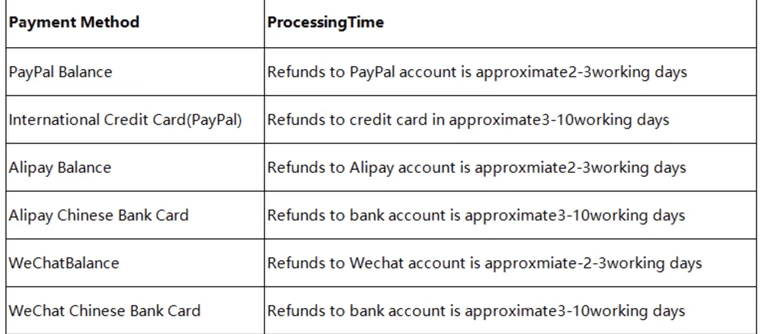
An eligible unused recharge can be returned through its original payment route under article 104; the application condition is more than two days after a successful recharge. Order cancellation or seller-return proceeds can instead appear as account balance. Ask which transaction is being refunded, then reconcile the credit before requesting any eligible withdrawal. Channel timing estimates are not guaranteed arrival dates, and additional identity checks described for remittance refunds should be handled only through the verified official channel.
Does Kakobuy test electronics
No. Help article 89 excludes authenticity, function and quality checks for electronics.
Is there a Kakobuy app
An iOS app is listed on the App Store (app id 6456410137); Android is offered as a direct APK download from the site.
Community feedback, read with care
Kakobuy runs an official subreddit, r/kakobuy, headed “Kakobuy Official Community”, created in October 2024 and showing about 21K members on 2026-10-10, plus an official Discord. It also runs a share programme that rewards posts and videos with points under published rules.
Community posts can help you ask a specific question about a route, variant or service. Compare relevant dates and order conditions, and distinguish rewarded posts from independent evidence. A detailed positive or negative report is still one experience; neither establishes a platform-wide success rate.

Make the first support message usable
State the order or parcel number, the status currently shown and the action you need: clarify a variant, request a measurement, check a return or explain a charge. Attach a screenshot of the relevant detail rather than the entire account page, and hide personal information before sharing outside the agent’s private support channel. If a deadline is close, include its displayed date and ask for a clear next action. Community posts can help you recognise an issue, but only the agent can inspect or change the order.